
Not all images of ID cards are approved automatically – the quality and content of your photo play a major role. Whether you use a physical ID card or a digital health card or driver's license, there are specific requirements that must be met before your bank accepts it. Below you will find a complete checklist as well as guidance for digital ID cards.
Checklist: Your ID card photo must meet these requirements
- The text is sharp and legible – not blurred or shaky
- All text is visible: name, address, driver's license number, full CPR number, etc.
- All corners and edges of the ID card are included in the image
- No fingers are covering relevant information
- The ID card has not expired
- The image is in natural colors – black/white is not accepted
- Confirm that your bank accepts the format, as not all approve digital ID cards
Digital ID cards – are they approved?
Not all banks accept screenshots of digital ID cards from the health card or driver's license app. As a rule of thumb, smaller banks more often approve digital ID cards, while larger banks typically may not.
Digital health card – how to do it correctly
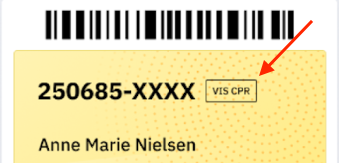
For a screenshot of your digital health card to be approved, the last four digits of your CPR number must be visible. Tap the "Show CPR" button before taking the screenshot.
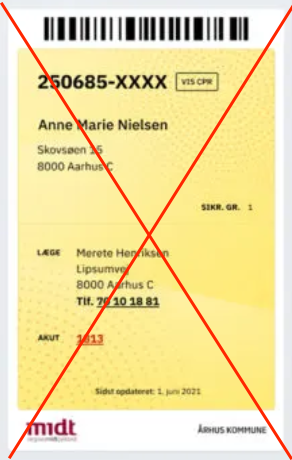
❌ See example of a non-approved digital health card
Digital driver's license – it is cumbersome and not recommended
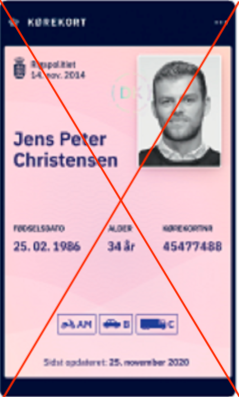
Screenshots of the digital driver's license are only approved if both sides appear in a single image. This is technically difficult and not a recommended approach.
If you still want to try, do the following:
- Take two screenshots – one of the "Driver's License" tab and one of the "Card Info" tab (the "Other information" section must be visible).
- Combine the two images into one, e.g., via a photo app.
- Only upload when both sides with all data appear in a single combined image.
❌ See example of a non-approved digital driver's license
Need help with your ID card?
If you are still unsure about the requirements, or if your ID card keeps being rejected, please contact Unioo's customer service.
📞 55 55 66 10